Beloved Stories: A Quirky Display Font for Creative Projects
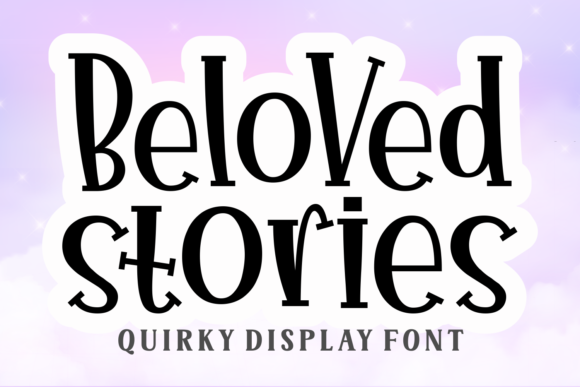
If you are looking to inject a sense of whimsy and personality into your next design, Beloved Stories is more than just another typeface; it is a statement. This quirky display font features bold and unique lettering that immediately captures attention. Unlike standard sans-serifs or traditional serifs that blend into the background, Beloved Stories demands to be read. It is designed specifically to bring a bit of fun to any craft or design project, making it an ideal choice for those who want their work to stand out.
However, while the visual appeal of this font is undeniable, there are specific pitfalls that creators often encounter when integrating such a distinctive typeface into their workflow. Many users rush to download and apply it without understanding its limitations or proper usage contexts. These oversights can lead to designs that feel chaotic rather than charming, or files that fail to print correctly on cutting machines like Cricut and Silhouette. To ensure your projects succeed, it is essential to approach Beloved Stories with a clear strategy.
Understanding the Unique Character of Beloved Stories
The primary reason designers gravitate toward Beloved Stories is its ability to convey emotion through form. The lettering is not merely functional; it tells a story before a single word is read. Its bold strokes and playful curves make it perfect for headlines, book covers, party invitations, and branding materials that need to feel approachable and warm. For entrepreneurs and small business owners, using this font can instantly shift a brand's tone from corporate to community-focused.
Yet, this uniqueness comes with a caveat. Because the letters are so stylized, they do not lend themselves well to body text or long-form reading. A common mistake is attempting to use Beloved Stories for paragraphs or detailed instructions. When overused, the font becomes visually exhausting, causing readers to lose interest quickly. The goal should always be to let the font shine where it belongs: as a focal point. Use it sparingly to highlight key messages, titles, or short phrases, and pair it with a clean, neutral font for the rest of your content.
Technical Pitfalls in Downloading and Licensing
Before you even open your design software, you must address the technical foundation. One of the most frequent errors made by hobbyists and professionals alike involves licensing confusion. Just because a font looks free online does not mean it is free for commercial use. Purchasing or downloading Beloved Stories from unauthorized sources can lead to legal issues down the line, especially if you are selling products featuring your designs.
Always verify the license terms provided by the official distributor. Check whether the license covers personal use only, commercial use, or extended rights for merchandise. Failing to check this detail can result in costly fines or the need to redesign entire campaigns. Furthermore, ensure you are downloading the correct file format. If you plan to cut shapes, you will need vector files (SVG or DXF), whereas screen designs might require high-resolution PNGs or OTF/TTF files. Mixing these up leads to pixelated results or failed cuts.
Integration with Cutting Machines: What to Watch For
Beloved Stories is compatible with cutting machines such as Cricut and Silhouette, which makes it a favorite among DIY enthusiasts and makers. However, compatibility does not guarantee ease of use. A significant number of users struggle with the intricate details of the font when sending files to their machines. The unique lettering often includes fine lines, sharp angles, or delicate connections between characters that can easily break during the cutting process.
If you attempt to cut a complex word without adjusting your machine settings, you risk ruining expensive materials like vinyl, cardstock, or iron-on transfers. The machine may skip a stroke, or the material might tear at a weak point. To avoid this, you must perform a test cut on a scrap piece of your intended material. Pay close attention to how the blade handles the thinnest parts of the letters. You may need to adjust the pressure setting or the blade depth specifically for this font.
Another critical step is ensuring the text is properly converted to paths or curves. In many design programs, text remains editable until you explicitly "explode" or "create outlines" the layer. If you send a raw text layer to a cutter, the machine might not recognize the font if it is not installed on the device itself. Always convert your text to shapes before exporting to ensure the cutting path matches the visual design exactly.
Evaluating Readability and Visual Hierarchy
Even with perfect technical execution, a design can fail if the visual hierarchy is off. Because Beloved Stories is so dominant, it can overpower other elements in your layout. Beginners often place too much white space around the text, making it look isolated, or crowd it with too many competing graphics. The solution is balance. Let the font breathe, but anchor it with supporting elements that complement its playful nature.
Consider the context of your project. Is this for a children's birthday party? Beloved Stories is a natural fit. Is it for a professional financial report? It would likely undermine your credibility. Evaluating the audience is crucial. If you are targeting adults aged 20–50, ensure the "fun" aspect aligns with their expectations. Sometimes, a slightly muted version of the font or a different color palette can make the difference between a design that feels trendy and one that feels dated.
Better Approaches for Professional Results
To maximize the potential of Beloved Stories, adopt a methodical approach to your design process. Start by sketching out your layout on paper or digitally before applying the font. Ask yourself what message you want to convey and whether this specific typeface supports that narrative. If the answer is yes, proceed with confidence.
When working with cutting machines, take the time to learn the specific capabilities of your software. Whether you are using Cricut Design Space or Silhouette Studio, utilize the tools available to weld overlapping paths or fix gaps in the lettering. These small adjustments can prevent frustrating failures during production. Additionally, invest in high-quality materials. A beautiful font applied to low-grade vinyl will still look cheap; the quality of the substrate matters just as much as the typography.
Finally, seek feedback. Before launching a campaign or printing a large batch of items, show your design to a peer or a potential customer. Their perspective can reveal issues you missed, such as poor contrast or illegibility from a distance. By focusing on these practical details, you ensure that your use of Beloved Stories enhances your project rather than detracting from it.
In conclusion, Beloved Stories offers a vibrant opportunity to elevate your creative work. By avoiding common mistakes regarding licensing, technical preparation, and visual balance, you can harness its full potential. Treat the font with respect, understand its limitations, and always prioritize the end-user experience. With the right approach, this quirky display font will become a reliable tool in your design arsenal, bringing joy and clarity to your projects.