Why Scary Is the Playful Asset Your Design Library Needs
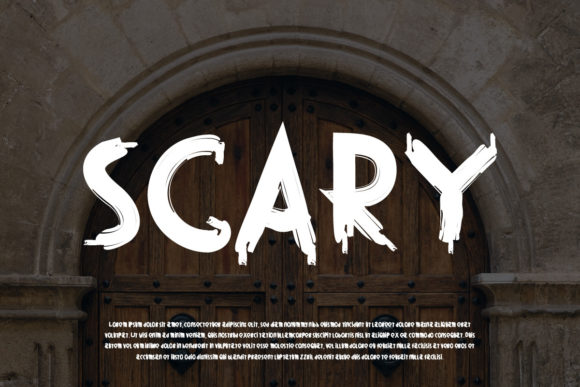
You might be staring at a screen, wondering why your latest project feels flat or lacks that spark of personality. Often, the problem isn't your layout or your color palette; it is the voice of your typography. Many designers and marketers rush to download generic sans-serifs or overly formal serifs, only to realize later that their message was lost in translation. This is where Scary steps in as a game-changer. Despite its name, this typeface is not about inducing fear; rather, it is a playful and fun display font designed to inject energy into any creation.
Whether you are a small business owner launching a quirky brand, a blogger trying to stand out in a saturated market, or an educator looking to make learning materials more engaging, this font has the potential to enhance your work significantly. However, simply downloading a font file does not guarantee success. There are specific nuances in how you choose, apply, and evaluate display fonts like Scary that can make the difference between a professional result and a chaotic mess. Understanding these details ensures you get the most value from your investment without falling into common traps.
The Misconception Behind the Name
The first mistake many people make when encountering a font named "Scary" is assuming it is strictly for Halloween decorations or horror-themed projects. While it certainly excels in those contexts, limiting its use to spooky themes ignores its true versatility. The playful nature of the letters allows them to convey humor, excitement, and approachability across a wide range of topics. If you restrict this font to only one niche, you are underutilizing a powerful asset in your library.
Consider a local bakery wanting to announce a new cupcake flavor. Using a standard serif font might look too serious. A bold, heavy blackletter could feel too aggressive. But using Scary creates an immediate sense of fun and whimsy that invites customers to smile. The key is recognizing that the font's character comes from its unique curves and spirited strokes, not just its name. When used correctly, it bridges the gap between professional branding and creative expression.
Pitfalls in Application and Hierarchy
Once you have decided to use Scary, the next hurdle is knowing where to place it. A frequent error among beginners is treating display fonts as body text. Because Scary is a display font, it is engineered for headlines, titles, logos, and short attention-grabbing phrases. It is not designed for long paragraphs of reading material. Attempting to set a blog post or a product description entirely in this typeface will result in poor readability and visual fatigue.
This mistake directly affects user experience and engagement. If visitors struggle to read your content because the letterforms are too stylized for extended reading, they will leave your page quickly. To avoid this, maintain a clear hierarchy. Pair Scary with a clean, neutral sans-serif or a simple serif for your body copy. Let the display font do the heavy lifting of grabbing attention, while the supporting font handles the delivery of information. This balance ensures your design remains accessible while still retaining that distinctive flair.
When Less Is More
Another overlooked detail is the volume of text used with Scary. Display fonts thrive on impact, which means they often require less text to achieve the same effect as a larger block of standard text. Overusing the font can dilute its power. If every sentence on your poster uses Scary, the eye has nowhere to rest, and the design loses its focal point. Instead, use the font strategically for key phrases or single words that carry the most emotional weight. This restraint makes the usage feel intentional and sophisticated rather than overwhelming.
Evaluating Quality Before You Buy
Before adding Scary to your toolkit, it is crucial to verify the quality of the font file itself. Not all display fonts are created equal. Some free versions found online may lack proper kerning pairs, resulting in awkward spacing between letters like "A" and "V." Others might miss alternate characters or ligatures that add polish to your design. These technical oversights can undermine the professionalism of your work, making even the best ideas look amateurish.
To ensure you are getting a high-quality asset, check the following before downloading or purchasing:
- Kerning Tables: Ensure the font includes optimized spacing for common letter combinations.
- Character Set: Verify that it supports the languages and special symbols you need, such as accented characters for international audiences.
- Licensing Terms: Understand the scope of use. Some licenses allow personal use but require a commercial extension for client work or merchandise.
- File Formats: Confirm the availability of web-ready formats (like WOFF2) if you plan to use it on a website.
Neglecting these checks can lead to costly rework or legal issues down the line. A font that looks great in Photoshop might fail completely on a mobile screen if the resolution is low or the format is incompatible. Always test the font in your actual workflow environment before committing to a full project.
Strategic Use for Different Audiences
Different professionals will find different strengths in Scary. For entrepreneurs and freelancers, this font serves as a tool for differentiation. In a sea of corporate blue and gray designs, a splash of playful typography can signal innovation and creativity. It tells your audience that you are human and approachable. For educators and bloggers, it acts as a hook to draw readers into complex topics by making the headers feel inviting rather than intimidating.
However, context is everything. If you are designing a financial report or a medical brochure, Scary might be too casual unless used very sparingly. The goal is to match the tone of the font with the intent of the communication. If your goal is to communicate trust and stability, pair Scary with conservative elements to create a balanced contrast. If your goal is pure entertainment, let the font shine without inhibition. Knowing when to hold back is just as important as knowing when to go wild.
Maximizing Value Through Experimentation
Finally, do not be afraid to experiment with size, color, and texture. One of the reasons Scary is such a wonderful asset is its adaptability. Try rendering it in giant sizes for billboards, or shrinking it down for social media icons. Combine it with gradients, textures, or drop shadows to add depth. The more you play with the font, the better you will understand its capabilities and limitations.
By avoiding the common mistakes of misapplication, poor quality control, and overuse, you can unlock the full potential of this playful typeface. Whether you are creating a logo, a social media campaign, or a children's book cover, Scary offers a unique opportunity to elevate your visual storytelling. Take the time to evaluate your needs, choose the right version, and apply it with intention. In doing so, you will ensure that your creations are not just seen, but remembered.